How to Play Bingo Escape
Pick a Destination, play classic 75-ball bingo with other players, use Steam Daubs to move closer to bingo faster, and collect rewards that help unlock your next stop.
Quick Start
- Sign in, optionally choose Today’s Route, collect your Daily Bonus when it is ready, and choose an unlocked Destination.
- Select 1 to 4 bingo cards, then tap Play to join the next round queue.
- Tickets are charged when the queued round starts, not when you first tap Play.
- Tap called numbers on your cards to daub them. Valid daubs earn XP for the round.
- Claim standard bingo lines or four corners when your cards qualify. The shared round ends when the bingos remaining counter reaches 0.
Your Main Counters
 Tickets
Used to enter rounds. Playing more cards costs more Tickets.
Tickets
Used to enter rounds. Playing more cards costs more Tickets.
 Steam Daubs
Special daubs that can move a card closer to bingo faster.
Steam Daubs
Special daubs that can move a card closer to bingo faster.
 XP
Earned from valid daubs, then added to your profile when the round completes.
XP
Earned from valid daubs, then added to your profile when the round completes.
 Souvenir Tickets
Used in the Item Shop to buy visible souvenirs.
Souvenir Tickets
Used in the Item Shop to buy visible souvenirs.
 Arcade Tokens
Earned from successful manual daubs and spent in the Arcade. The balance resets each Sunday.
Arcade Tokens
Earned from successful manual daubs and spent in the Arcade. The balance resets each Sunday.
1. Start at the Station
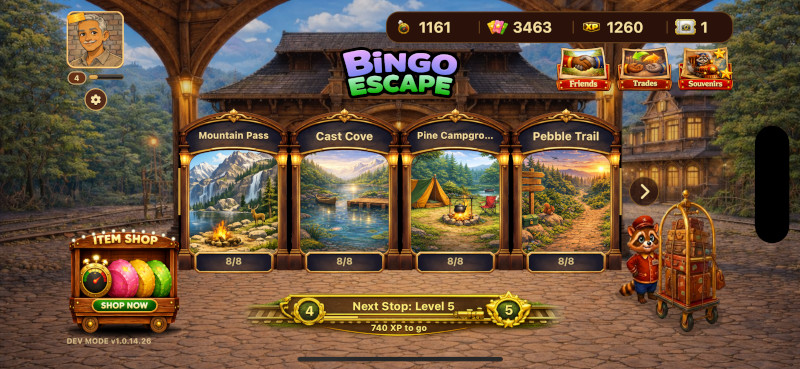
The Station is your home screen. It shows your account counters, Daily Streak, Today’s Route and Traveler Punch Card, level progress, Daily Bonus, friends, souvenirs, Item Shop, Arcade, personal share link, and the Destination picker.
Unlocked Destinations can be entered right away. Locked Destinations open as you complete souvenir collections from earlier Destinations. Players who have unlocked every current Destination show the First Class Travel Pass decoration on their avatar, but new Destinations are added over time, so staying current matters.
2. Choose Cards and Join
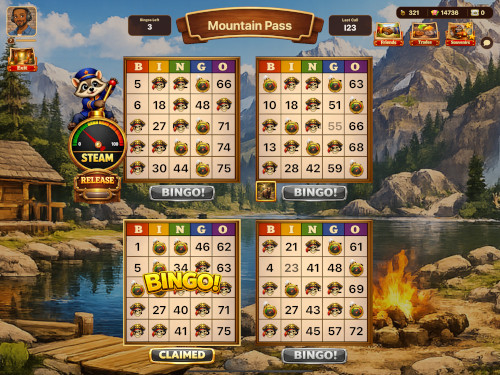

Inside a Destination, pick how many cards you want to play. One card is easier to watch. Four cards give you more chances to find bingo, earn XP, and chase rewards.
After you tap Play, you enter the queue with other players. Bots may join if a round needs another competitor. If you leave before the round starts, no entry Tickets are spent. Once the round starts, the server charges the entry cost and the round is live.
3. Daub Called Numbers
Watch the called ball and tap matching numbers on your cards. Correct daubs are kept by the server, earn round XP, and move you toward bingo. A free center square may already be marked on each card.
Successful manual daubs also count toward the Arcade Tokens awarded when the round completes. The current earning rate is shown in the app. Marks placed by Steam Daubs do not count toward Arcade Tokens.
Steam Daubs are special daubs that help you advance a card faster. Look for the Steam controls and release button during the round.
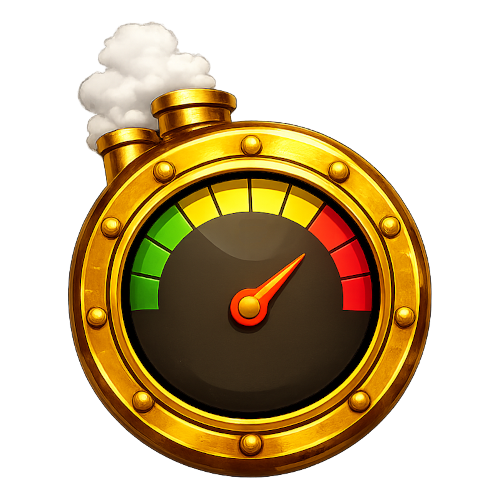 Steam Daubs are limited, so save them for cards where one more mark could change the round.

4. Claim Bingo
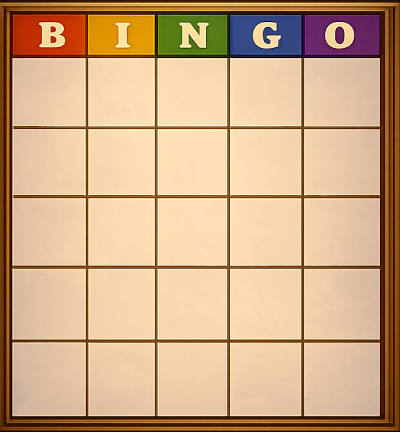
A bingo is a completed standard line or all four corners on a card. When a card is ready, tap the bingo claim button. Claimed cards stay claimed, and you can keep playing any remaining cards in the same round.
The bingos remaining counter in the top-left corner shows how many more bingos are available. When that number reaches 0, the round ends for everyone, regardless of how many bingos you personally claimed.
If you are confident in your card, you can sometimes claim strategically. Waiting a little may let you keep daubing, earn more XP, build more Steam, and make more Steam Daubs available before the round closes.
5. Rewards, Souvenirs, and Progress
Round rewards can include Tickets, Steam Daubs, XP, and Destination souvenirs. Souvenirs are tied to Destinations and help unlock later Destinations when sets are completed.
The Daily Bonus is available from the Station and can award useful resources. Subscribers receive an increased Daily Bonus while their subscription is active.
Signing in on consecutive days builds your Daily Streak. The day’s Free Steam allowance is available again in every round you join that day, is used before your saved Steam Daubs, and does not carry into a later day.
Each day, you can choose one available Today’s Route. Completing its round or bingo goal awards the listed Tickets and Steam Daubs and adds one punch to your Traveler Punch Card. Punch 10 completes the card, awards the displayed card prize, and begins a fresh card the next day.
If you are running low, the Item Shop has items available. You can also work with other players to trade Tickets, Steam Daubs, and items that help you complete a Destination and unlock the next one.
Some souvenirs are not tradable. Those must be earned through gameplay or purchased with a Souvenir Ticket when available.

6. Visit the Arcade and Collect Daubers
Tap the Arcade button in the Station to play the Claw Machine. Insert the displayed number of Arcade Tokens, choose a claw position, and drop the claw for a chance to win Tickets, Steam Daubs, Arcade Tokens, Souvenir Tickets, or collectible Dauber designs.
Dauber designs are collectible profile flair. Open your Traveler Profile to choose an owned Dauber; your selected design appears with your profile in many player lists and social areas. Daubers are unique unlocks, so receiving one you already own does not add a second copy or a substitute prize.
Limited first-purchase promotions may also award a special Dauber. When the Founder Dauber offer is displayed in the Station, make your first qualifying Item Shop purchase during the offer period to receive it automatically after the purchase is validated.
7. Leaderboards, Referrals, and Station Surprises
Open Friends and choose Leaders to compare your Daily Wins with friends and All Travelers. A Daily Win is a completed round in which you claimed at least one accepted bingo; accepted bingos break ties.
Use your personal share link in the Station to recruit a new traveler. When an eligible new player creates an account through your link and completes their first round, the configured referral bonuses are awarded to both of you. Installing the app or creating the account alone does not release the rewards.
While you are waiting to play inside a Destination, a cheese-chasing rat may occasionally appear near the Play button. Tap it before it disappears to claim a surprise reward.
Friends and Chat
Destination Chat lets players talk during Destination play. You can turn chat on or off in Settings, block players, and manage blocked players from the Settings screen.
To meet more players, organize trades or games, and share wins, join the Bingo Escape Travelers Facebook Group.
Keep chat friendly and avoid sharing personal information. Reports, blocks, mutes, and bans help keep the game safe.